Canasta
- 4.5
- Rating
- 500.00K
- Installs
- Free
- Price
 Analysis by App-foxy
I like card games that are easy to understand but still give me something to think about after the first few hands. Canasta fits that space well. This version from North Sky Games keeps the familiar Canasta format at the center and adds multiplayer, making it suitable for a quick solo session or a longer match with other people. It is free to start, aimed at Everyone, and has built a solid audience with a 4.5 average from around 18 thousand ratings and more than 500 thousand installs.
My experience with it is that the rules are not the main obstacle. The real friction usually comes from getting comfortable with the app’s flow: knowing which mode to choose, understanding what the current hand is asking you to do, and recovering calmly when a match does not behave as expected. Once those small points become familiar, the game feels much more natural.
Getting comfortable with the table and the first hand
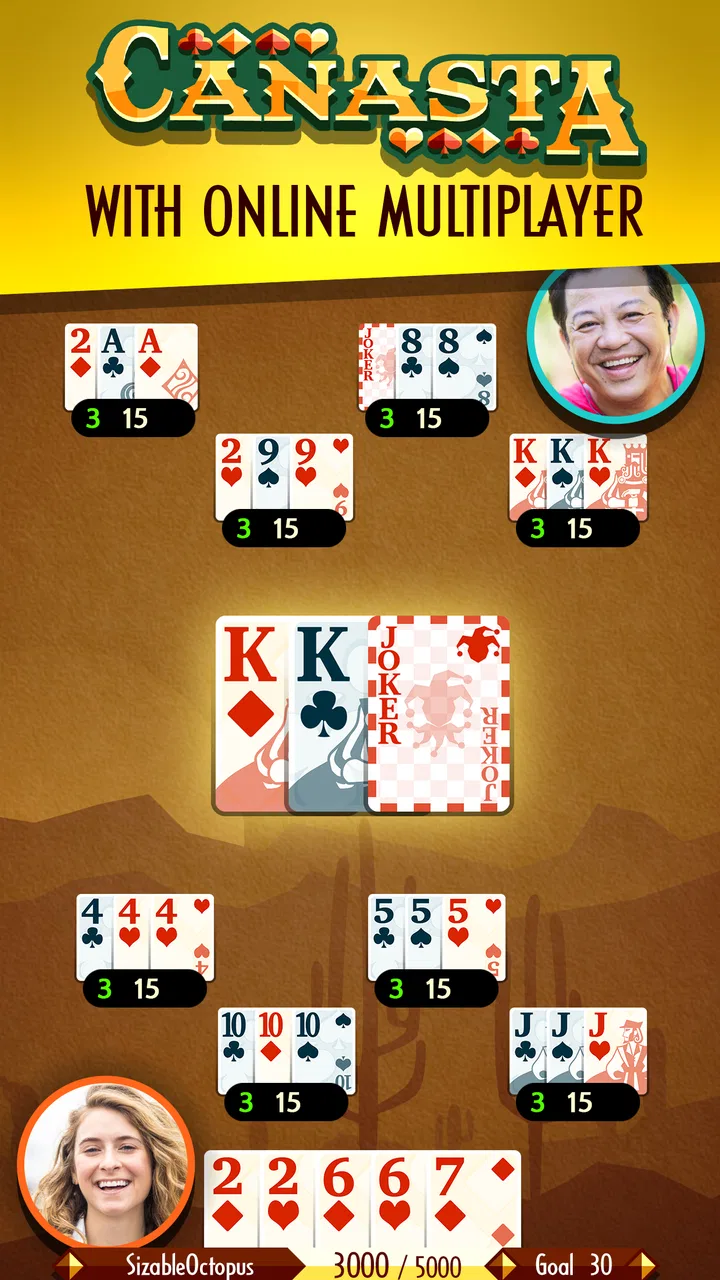
Canasta is a traditional card game built around collecting matching cards and creating melds. If you already know the physical version, the basic objective feels familiar, but playing on a phone changes the rhythm. The screen has to show your hand, the discard pile, the stock, and the available actions without giving you the same visual space as a real table. I found that the first few rounds are as much about learning where to look as they are about making good decisions.
You May Also Like

 Blood Strike: 2.5 Anniversary
Blood Strike’s Loadouts Turn Every Drop Into a Tactical Gamble
A close look at Blood Strike’s custom loadouts: how fast access to signature weapons reshapes its battle royale rhythm, rewards preparation, and narrows the gap between fights.

 Pandora - Music & Podcasts
Pandora’s Music Is Easy to Start, but Harder to Recover
Pandora’s strength is its low-effort path from a seed to a station. Its weak spot is how much confidence it asks you to place in connection, setup, and quiet recovery.

 8 Ball Pool
8 Ball Pool Is Built on Rivalries, Rematches, and Routine
A close look at the rivalries, rematches, shared routines, and unanswered safety questions that turn a quick pool match into a persistent mobile community.

 Samsung Music
Samsung Music’s Quiet Strength Is Playing What You Already Own
Its reach comes less from spectacle than from dependable access to a personal library. That simplicity is both the app’s strongest retention engine and its ceiling.

 AccuWeather: Weather Radar
AccuWeather Review: A Quick, Clear Forecast for Everyday Decisions
For everyday plans, the best forecast is the one you can understand quickly. AccuWeather makes rain timing, radar, and local conditions easy to act on, with a few trade-offs.

 Hill Climb Racing
Why Hill Climb Racing Still Turns Crashes Into One More Run
A tiny car, a bumpy hill and one more upgrade: Hill Climb Racing keeps resurfacing because its simple chaos makes every near-miss feel personal.
More From Our News Desk



The most common beginner mistake is treating every playable card as equally valuable. A card that completes a useful group may also reveal information to the other side or leave your hand awkwardly exposed. I try to pause before each discard and ask two simple questions: does this card help me build toward a larger meld, and am I making the next draw easier for an opponent? That small habit is more useful than rushing through the turn.
The multiplayer focus also changes what I expect from a session. A solo card game can be played at any pace because the computer does not need to wait for me. With other players, a pause, a connection interruption, or an unclear turn can feel more serious. I recommend beginning with a short practice session before inviting someone else, especially if you have not played Canasta recently.
One detail that deserves attention is the discard pile. New players often look only at their own cards and forget that the pile can become the most important source of information on the table. Before taking it, I check whether the visible cards actually improve my plan or merely tempt me into collecting too many unrelated cards. Taking a large pile can feel exciting, but it can also leave the hand difficult to organize.
The best early improvement is learning to read the whole table, not just the cards in your hand. Watch what disappears, notice which kinds of cards are being discarded, and avoid building a plan that depends on one very specific draw. This makes the game feel less random without pretending that luck is not part of card play.
What to check before starting multiplayer
Because multiplayer is a central part of this release, I would not judge the app only by a single first launch. Before starting a serious match, I make sure the game is updated and that the device has a stable connection. The current version is 2.2.5, and the listed minimum operating system is Android 7.0. Anyone using an older device should check compatibility before spending time trying to install it.
It is also worth checking that the game has finished loading before tapping repeatedly on a choice. On a small screen, a delayed response can make it look as if a button did not register, which may encourage several taps. Waiting a moment avoids accidental actions and makes it easier to tell whether the problem is the interface or the connection.
I prefer to begin with the phone charged and notifications reduced. That is not a Canasta rule, but it matters in a multiplayer game. A call, message, or system interruption can pull attention away at exactly the wrong moment. If you are playing with a friend, agree beforehand that the first match is mainly for learning the pace and controls rather than proving who is better.
Another useful setup check is deciding whether you want a relaxed game or a more focused one. Canasta can fill a few spare minutes, but a complete match may demand more attention than a quick solitaire round. If I only have a moment between tasks, I do not start a multiplayer session that I might have to abandon. For a quiet evening, however, the format works much better because I can consider the discard pile and plan several turns ahead.
The game is free, but it includes in-app purchases ranging from $2.99 to $99.99 per item. That makes it sensible to review purchase controls on the device before handing the phone to a child or letting someone else play. The Everyone rating makes the game broadly approachable, but an age rating does not replace ordinary care around purchases and screen time.
Recovering when a match does not go smoothly
When a game appears stuck, my first step is to avoid tapping over and over. I wait briefly, check whether the turn has changed, and confirm that the device still has a connection. If the table resumes, I continue from the current state rather than assuming the previous tap failed. This simple approach prevents a lot of confusion in turn-based play.
If the app closes or returns to the home screen, I reopen it and look for the existing match before starting another one. Beginning a second game immediately can make it harder to understand whether the first session was interrupted or simply slow to respond. I also avoid switching between several demanding apps while a multiplayer match is active, since reducing background pressure is a sensible general troubleshooting step.
For installation problems, I check the operating system requirement, available storage, and the device’s connection before blaming the game. A restart can clear a temporary issue, while updating the app can address compatibility problems. These are ordinary checks, but they are especially important here because the experience depends on both the card interface and the online part of multiplayer.
One practical recovery habit is to remember the position of the match before leaving it. I mentally note whose turn it was, what I was collecting, and whether the discard pile had become important. If I return after an interruption, that quick summary helps me continue without making a rushed discard. It also reduces the temptation to restart simply because I have lost the thread of the hand.
There is a difference between a game being slow and a move being unavailable. Sometimes I expect to take an action that the rules do not allow in the current situation. Before treating that as a technical problem, I reread the cards on the table and check whether the required combination is actually present. Digital card games are helpful because they can prevent illegal moves, but that protection can initially feel like the app is refusing to cooperate.
How to improve your decisions without overcomplicating play
I enjoy the strategic tension of deciding whether to keep a card for later or discard it now. A useful workflow is to sort my thinking into three groups: cards that immediately support a meld, cards that might become useful with the right draw, and cards that are mostly blocking the hand. I do not need to make a perfect plan; I only need to avoid keeping too many weak possibilities at once.
Another non-obvious trade-off is that a larger collection is not automatically a better collection. Taking more cards from the discard pile can create several opportunities, but it can also make the hand harder to manage and increase the number of decisions on later turns. I usually take the pile only when it supports a clear direction rather than because it looks generous.
Timing matters as well. Holding a useful card can deny an opponent an easy match, but holding it too long may prevent me from completing my own plan. I pay attention to repeated discards and to the kinds of cards the other side seems willing to release. This is where the multiplayer mode feels different from playing against a predictable routine: another person may discard for reasons I cannot immediately see.
For a realistic everyday scenario, imagine having half an hour after dinner and wanting something more engaging than scrolling. I would open the game, play one relaxed match, and treat the first few turns as a warm-up rather than trying to optimize every draw. If a friend is available, multiplayer adds conversation and uncertainty. If not, the card format still works as a quiet way to concentrate, provided I am willing to give it more attention than a very casual matching game.
That also explains who may want to skip it. If you want a game that can be understood in seconds and abandoned without consequence, a simple solitaire title may be a better fit. If you dislike card luck, Canasta may feel frustrating even when your decisions are sound. And if your main goal is a deep competitive ranking system, this is not the first card game I would choose based on the information available in the app’s presentation.
Where it compares well with other card games
Compared with basic solitaire, Canasta offers more social tension and more room for planning, especially when multiplayer is involved. Solitaire is often better for a completely private, interruption-friendly session. Canasta asks me to consider another player’s choices, which makes each discard more meaningful but also makes the experience less forgiving when I have to step away.
Compared with fast collectible card games, this version is calmer and more recognizable. There is no need to learn a large library of characters or build a complicated deck before understanding the appeal. The trade-off is that players looking for dramatic effects, rapid battles, or constant new content may find the traditional structure restrained.
It also has a different appeal from a physical Canasta table. The app handles card placement and legal actions, so I do not need to manage a deck or keep score manually. That convenience is valuable when I am playing alone or when another person is not nearby. On the other hand, a phone screen cannot fully reproduce the social atmosphere of sitting around a table, and multiplayer depends more on the reliability of the digital session.
The developer, North Sky Games, has kept the identity of the game clear rather than burying the card play under unrelated systems. I appreciate that focus. Still, the free-to-play structure means I would review any purchase prompt carefully instead of assuming that every optional item is necessary for enjoying the core game. The price of entry is appealing, but the presence of purchases is worth remembering for families and for anyone trying to keep mobile gaming strictly free.
Who will enjoy it and who should choose something else
I would recommend this game to someone who already likes classic card games, wants a familiar Canasta experience on a phone, or enjoys alternating between solo concentration and multiplayer interaction. It is also a reasonable choice for a player returning to Canasta after a long break, because the digital table gives a clear place to practice the flow of drawing, melding, and discarding.
I would be more cautious recommending it to someone who has never played Canasta and dislikes learning through trial and error. The rules become manageable, but the strategic choices are not always obvious during the first few hands. A patient friend or a low-pressure practice session can make the transition easier than jumping directly into a competitive match.
Players with older phones should pay attention to the minimum operating system requirement before planning around the app. People with unreliable connections should also favor sessions when they know they can stay online. The game itself may not be the cause of every interruption: weak Wi-Fi, device storage, background activity, or an outdated system can all create symptoms that look like an app problem.
The app has been available since Nov 23, 2016, and its current version is 2.2.5. I see that long-running presence as useful context rather than a guarantee that every device will behave identically. Mobile hardware, operating systems, and connection conditions vary, so sensible setup checks remain worthwhile even with an established game.
My practical verdict
Canasta is at its best when you want traditional card strategy with a social option, not a flashy arcade experience. I like its clear identity, the familiar structure, and the way multiplayer gives ordinary discards more weight. The game rewards patience, observation, and a willingness to learn the table instead of simply tapping the most obvious move.
Its limitations are equally clear. The first session can feel less smooth while you learn the interface and the rules, multiplayer is more sensitive to interruptions than a private card game, and the free format includes optional purchases that deserve attention. Those are not reasons to reject it, but they do affect who will enjoy it most.
For me, the deciding question is whether I want a thoughtful card match or an instantly disposable distraction. When I want the former, this release from North Sky Games is a convincing choice. I would install it for a friend who enjoys classic Canasta, has a compatible device, and is comfortable giving the game a few hands before judging it. If that sounds like you, the free starting point makes it easy to try, while the Everyone rating keeps it approachable for a broad audience.
FAQs for Canasta
01What is Canasta and how is the game played?
Canasta is a classic card game based on forming melds, usually groups of cards with the same rank. In the app, you can typically play against computer opponents or other people online, depending on the available modes. The main objective is to create combinations, build canastas of seven cards, score points, and reach the target score before your opponents. Rules and scoring options may vary by version.
02Can I play Canasta offline without an internet connection?
Many Canasta apps include an offline mode against artificial-intelligence opponents, which is useful when traveling or when you do not have a reliable connection. However, online multiplayer, leaderboards, account synchronization, advertisements, and certain events may require internet access. Before downloading, check the app’s store description because offline availability can differ between Android and iOS versions.
03Does Canasta support multiplayer games with friends?
Most modern Canasta games offer some form of multiplayer, although the exact options depend on the application. You may be able to invite friends through private tables, connect through an account, or join public matchmaking rooms. Some versions focus mainly on solo play. It is also worth checking whether multiplayer requires registration, an internet connection, or a paid subscription.
04Is Canasta free to download and are there in-app purchases?
Canasta is commonly available as a free download, but free versions may be supported by advertisements or include optional purchases. Payments can sometimes remove ads, unlock additional game modes, provide cosmetic features, or offer virtual currency. The core card game may remain playable without spending money, but you should review the store listing and purchase details before confirming any transaction.
05Is Canasta suitable for beginners, and can I customize the rules?
Canasta can be enjoyable for beginners, especially when the app provides tutorials, hints, explanations of valid melds, and adjustable difficulty levels. Some versions also let you select different rule sets, scoring targets, partner arrangements, or variations such as classic and modern Canasta. Since rules differ between regions and apps, new players should review the in-game instructions before starting a competitive match.
Pros
- Classic card game rules are easy to learn for beginners.
- Supports relaxed
- turn-based play at your own pace.
- Strategic meld building keeps longer matches engaging.
- Clear card layouts make suits and values easy to follow.
- Good choice for fans of traditional family card games.
Cons
- Match length can feel slow when opponents take extended turns.
- Limited appeal if you prefer fast-paced or action-focused games.
- Random card draws may occasionally outweigh careful strategy.
- Some features may require an internet connection or account access.
- Difficulty can vary noticeably between opponents or game modes.

Canasta
Gallery